Skip to content

For businesses · Starvie

Get your business discovered.
Make incoming visits
visible.

Partner with creators. Track visits driven by content and your campaign budget in one place.

Calculate your costs

The visit fee and cap are set together before you start.

Web and mobile, together

Control your business
from one dashboard.

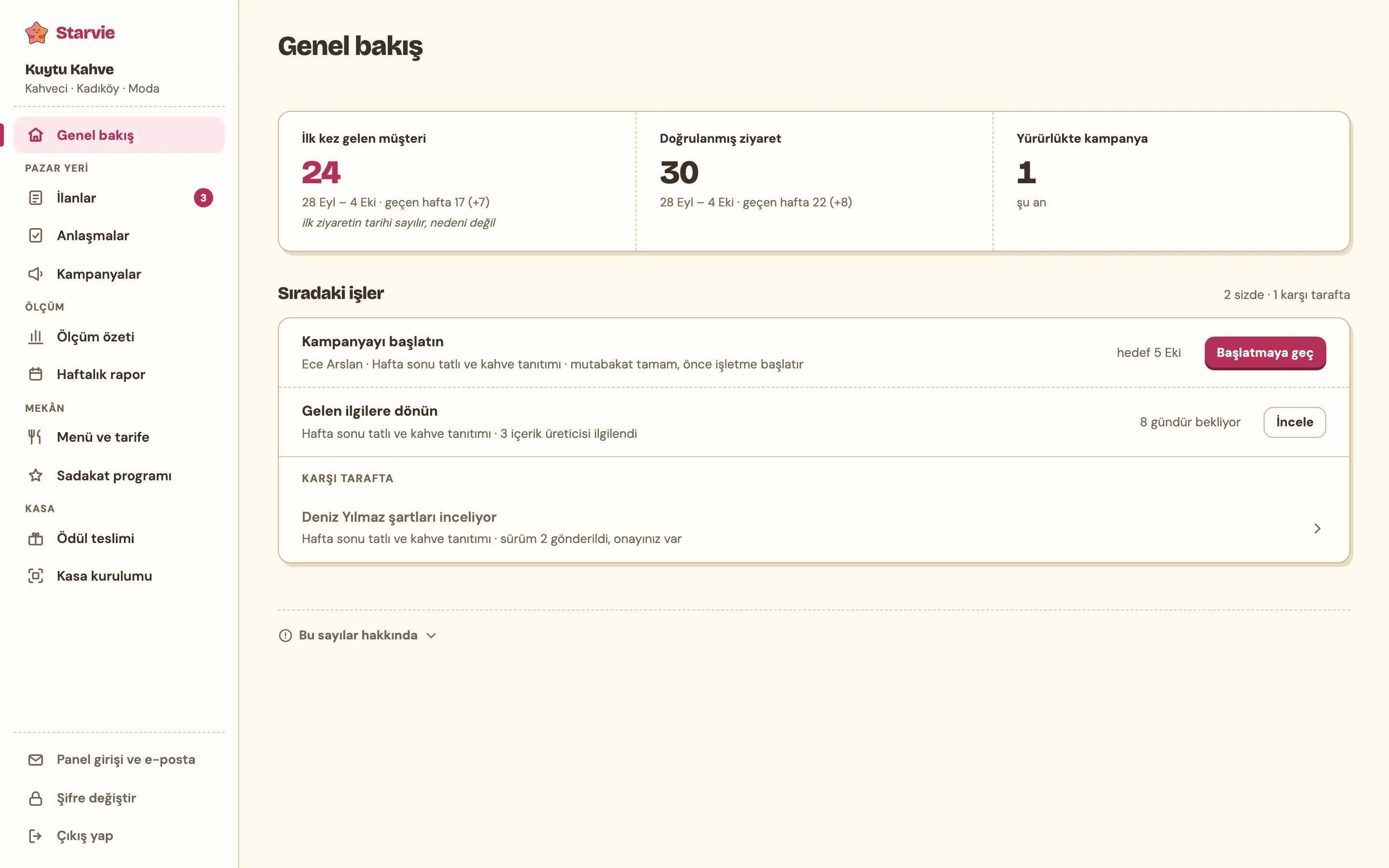
Manage agreements, campaigns and weekly reports on the web. Track verified visits on your phone, too.

Starvie business dashboard overview: first-time customers, verified visits, active campaign and next steps
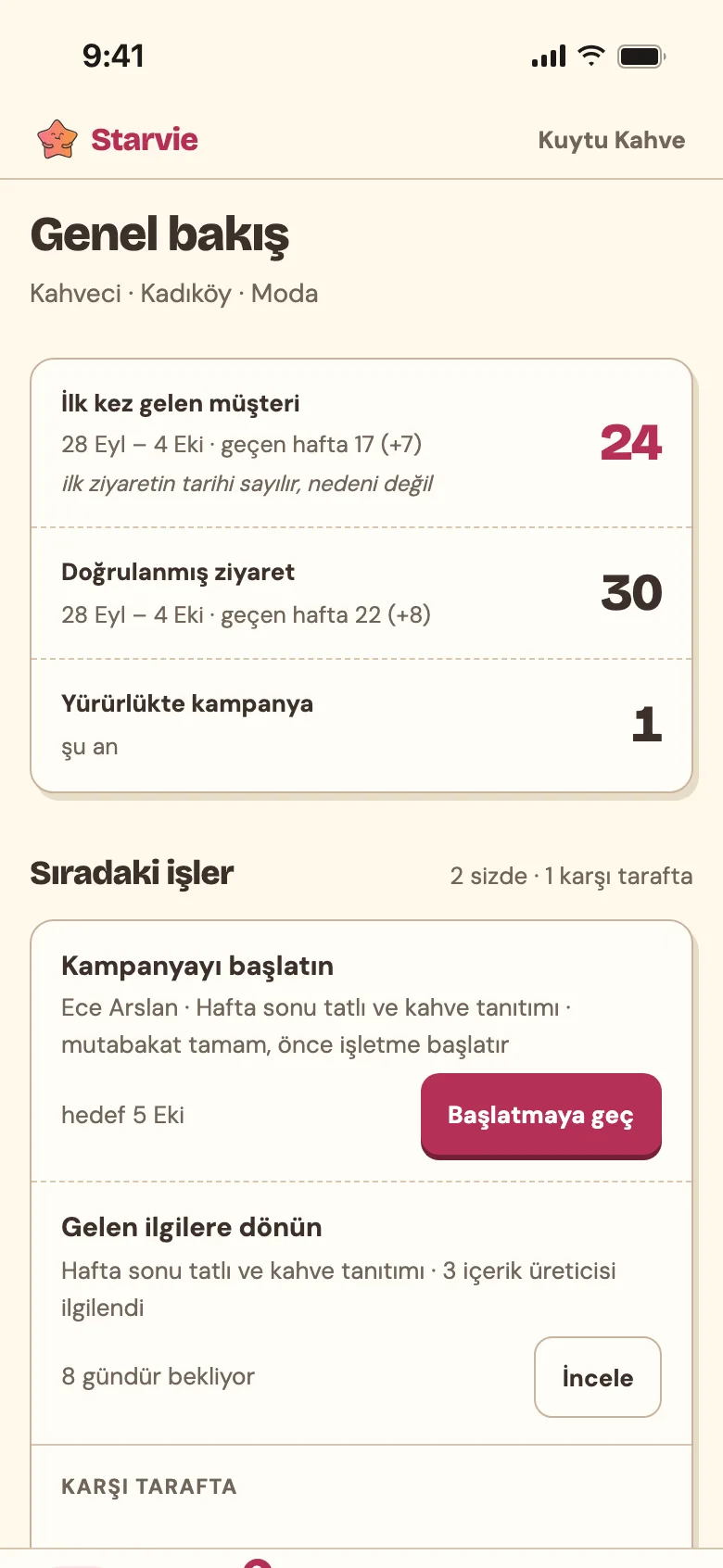
Starvie business dashboard on a phone: first-time customers, verified visits and next steps
Real app screensShown with sample data. Product screens are in Turkish.
From content to your business, from visits to loyalty

A bond that starts with discovery,
continued at your business.

A creator introduces your business. When guests arrive, they verify their visits and earn points specific to your business.

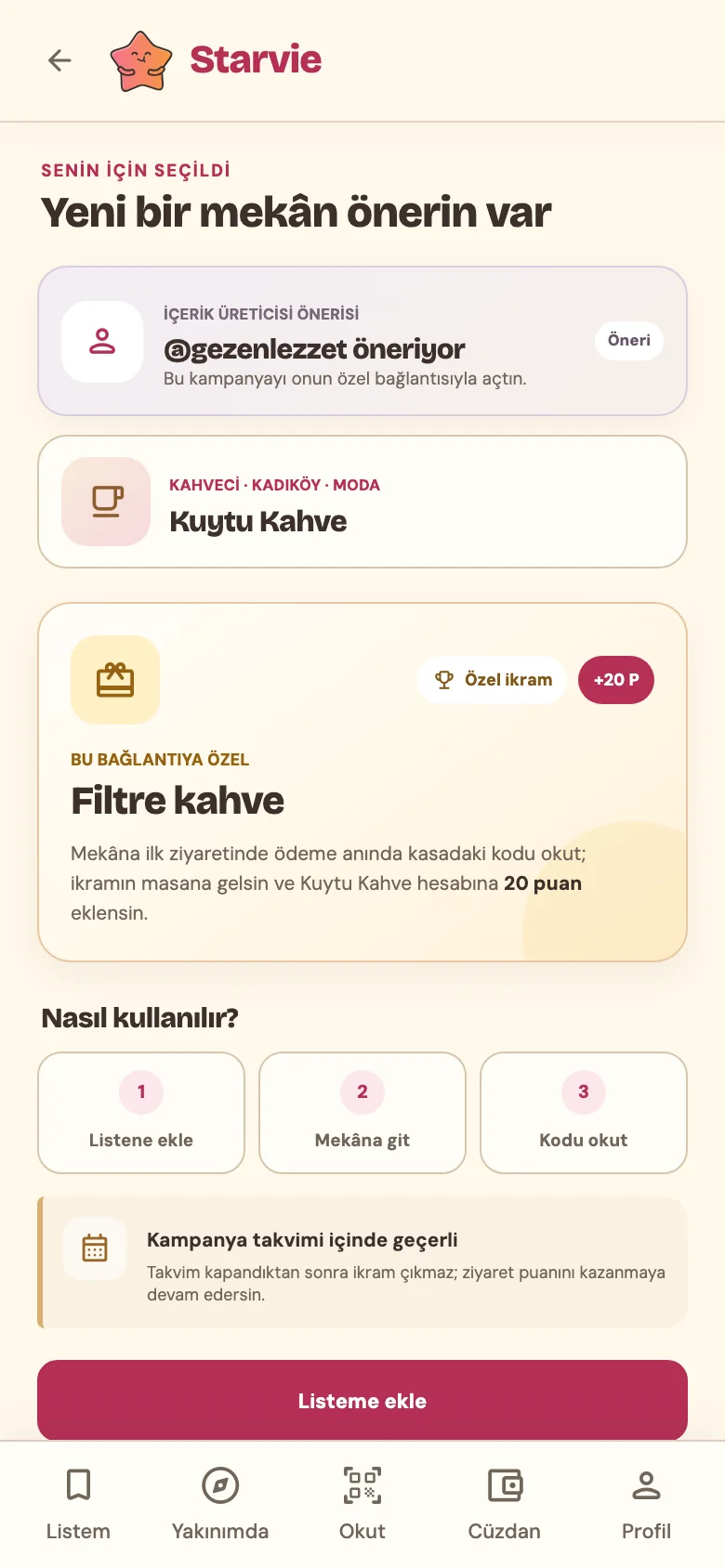
  1. Screen opened by the campaign link: Kuytu Kahve, a filter coffee treat and the Add to my list button
    01 / DISCOVERY

    Discover. Save.

    Guests explore your business through the content link and can add it to their list.

    Value for your business Interest driven by content becomes visible.
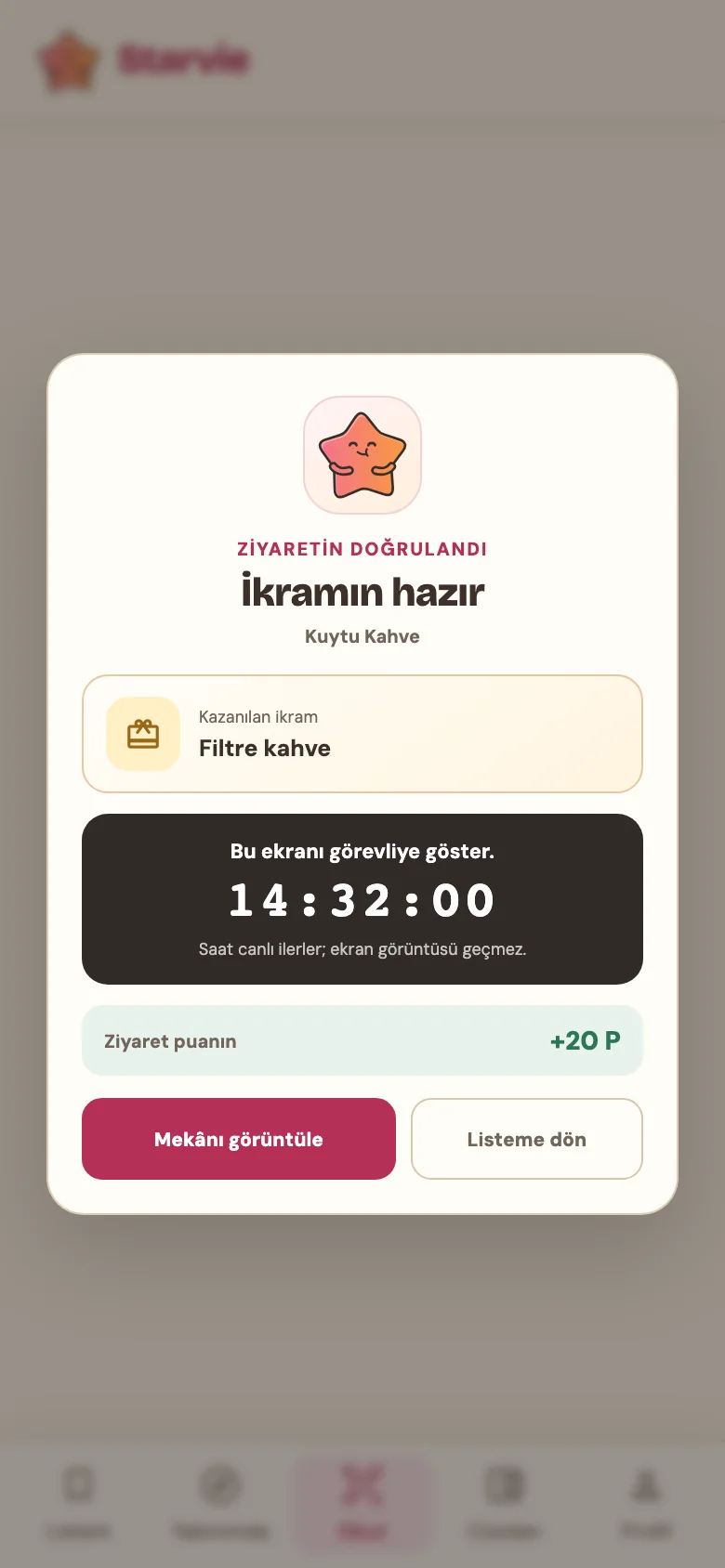
  2. Confirmation screen after scanning at the counter: treat ready, filter coffee and a live clock
    02 / VISIT

    Visit. Scan.

    Guests verify their visit using the code at the counter. They can enjoy a campaign treat, if offered.

    Value for your business The visit linked to the campaign appears in your report.
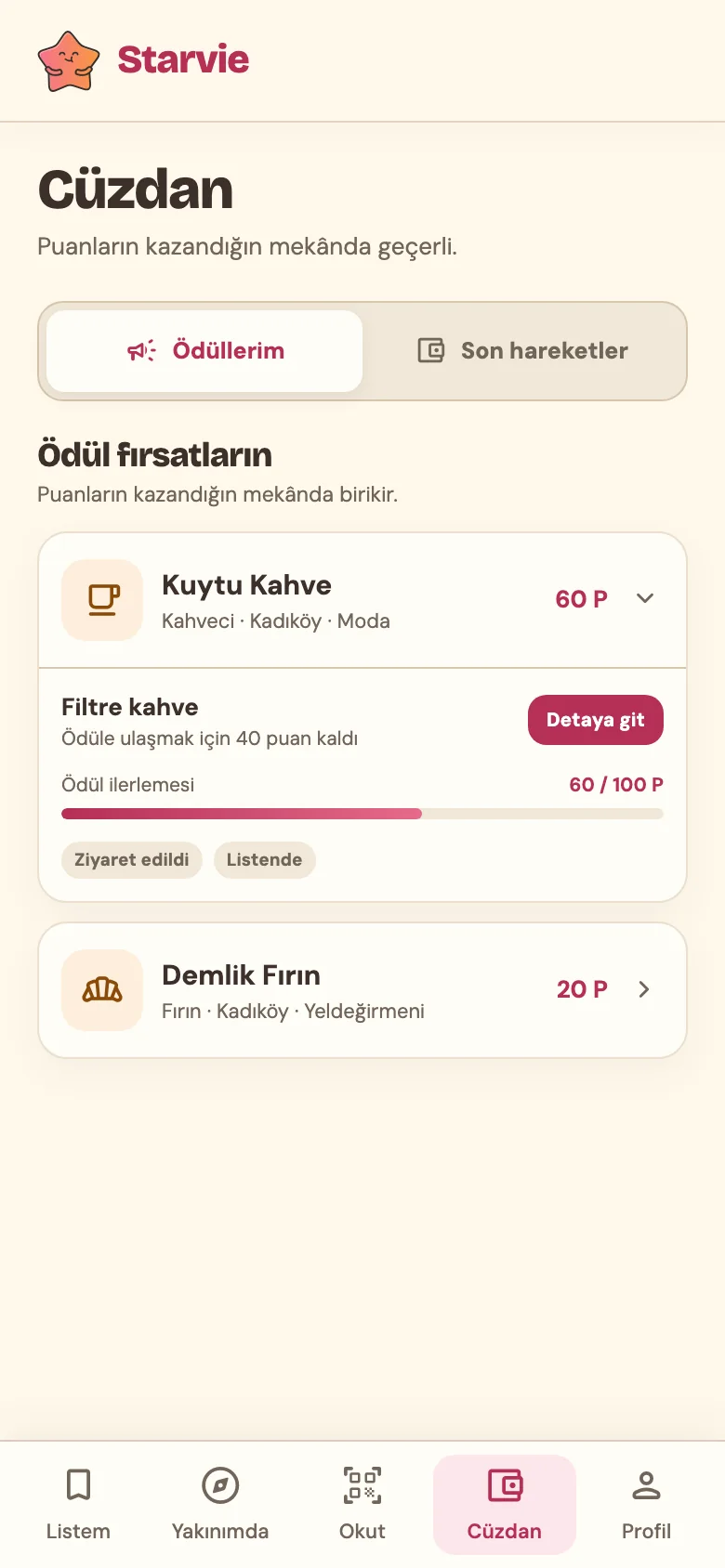
  3. Wallet screen: 60 points at Kuytu Kahve, 40 points to a filter coffee
    03 / LOYALTY

    Collect points. Build a connection.

    Points specific to your business build towards a reward from your own menu.

    Value for your business A reason to be chosen again.

Guests collect points.
You track first and repeat visits separately.

  • No download requiredGuests can join in their browser.
  • Treats and points are separateCampaign treats are optional.
  • Points belong to one businessThey cannot be transferred to other businesses.
Sample report

A result in hand, every week.

See verified visits and campaign spend in the same report.

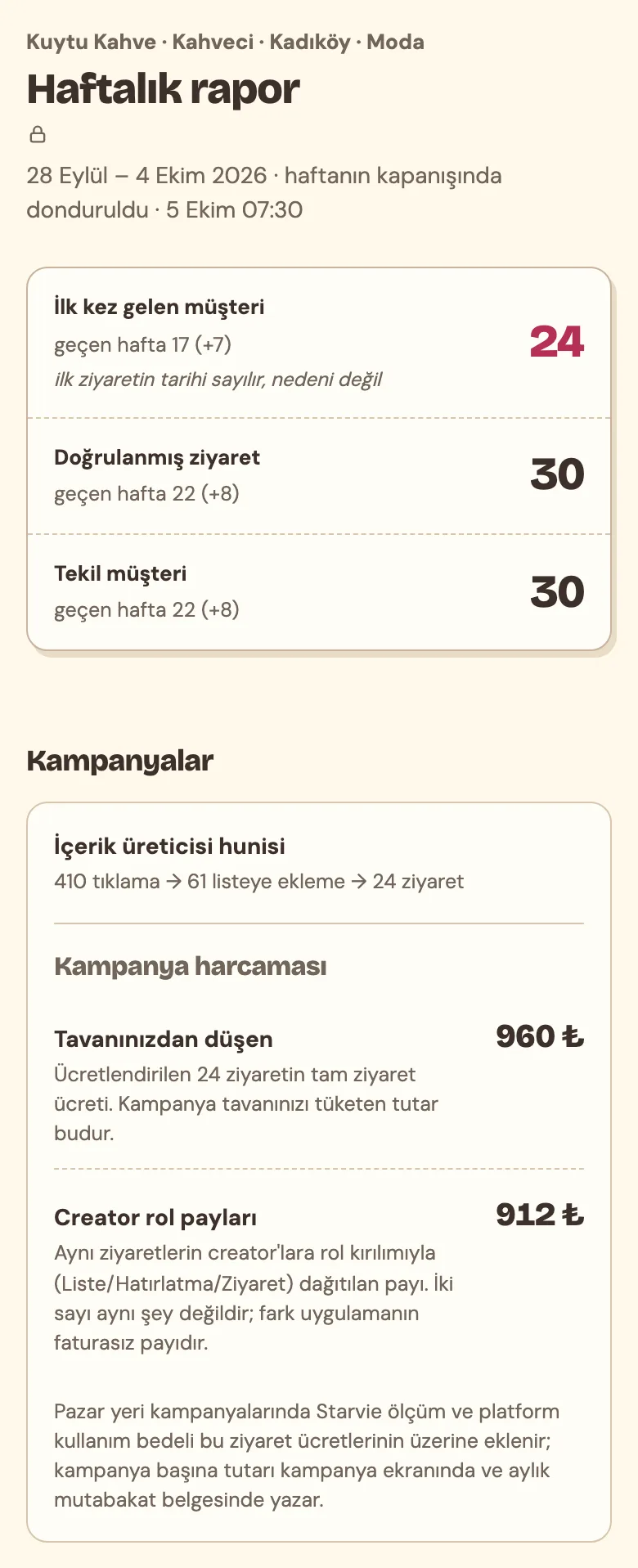
Weekly report screen: 24 first-time customers, 30 verified visits, visits by day, visit and counter table, creator funnel and campaign spend
Real report screen · Shown with sample data, in Turkish. The report is frozen every Monday when the previous week closes.

First or repeat visit?

See first verified visits and returning guests separately. This does not mean it is the guest’s first-ever visit.

Reported separately

Which content brought them here?

Link clicks, saves and counter verifications are shown together so you can track performance clearly.

Matched via the campaign link

How much of the budget was used?

See visit spend and the creator’s role-based share in one report, and avoid surprise costs.

Transparent cost breakdown
Principles for businesses

Control and security, both in your hands.

No extra device or integration needed.

AT YOUR BUSINESS
One card at the counter. That’s all.Guests only need their phones. No new device or checkout integration is required.Illustrative card design · This code is not for use.

The system records the visit, not a self-report.

Neither the business nor the creator enters the count. Guests scan the QR code at the counter when settling their bill, and the system records the visit under its verification rules.

Visit verification at the counter

Zero devices, zero integrations.

A card at the counter and a short staff briefing. Allow about 45 minutes for setup; you can leave when the campaign ends.

About 45 minutes to set up · No extra device

You control the campaign.

Set the paid-visit cap, the view tiers and any optional treat. Once the cap is reached, no further visit fees accrue, but measurement continues. View rewards and treat costs are separate.

A controlled visit budget
We count verified visits. We do not measure tables, bill amounts or whether a payment was completed. Limits of measurement
Transparent measurement

What do we count?

Each account that scans the code at the counter is counted at most once per day at the same business.

We count visits

If three people at the same table each scan the code, three visits are recorded; if only one scans, one visit is recorded.

By QR code or manually entered code

We do not measure payments or revenue

We do not connect to your checkout software. Bills, orders and table counts are not part of the report.

Your privacy is protected

Daily limit

The same user account is counted at the same business only once a day. Creators do not earn from their own visits.

Instant, with a live confirmation screen

How is a visit verified?

1
The business code is recognised Guests scan a QR code or enter the code manually.
2
Location is checked Scans outside the business’s permitted distance are rejected.
3
The daily limit is applied The same user account is counted once a day at the same business.
4
Live confirmation appears Staff see a running clock on the screen.
Which visits are attributed to a creator?

Visits matched to the campaign link and verified at the counter are counted. Guests who do not scan the code are not counted. A guest who watches the video but never taps the link is not attributed to the creator.

Tapping the campaign link is enough for the match; saving the business is optional. A verification without a link tap is recorded as an app-sourced visit and does not generate visit earnings for a creator.

A fee accrues on a guest’s first verified visit to your business. Later visits by the same guest appear as repeat visits in the report and do not generate visit fees.

What does “first-time” mean?

It means an account with no previous valid visit recorded at this business. It does not prove that this is the guest’s first-ever visit or that they would not have come without the campaign.

First recorded and repeat visits appear separately in the report. View counts come from the creator’s insights screen; in a view-reward agreement, the creator declares the count with a screenshot and Starvie checks and approves it.

Campaign types

Two routes, the same measurement.

You can choose the creator yourself and link payment to how often the video is watched, or set out your terms and open the door to everyone who accepts them. Either way, payment for the guests who come is tied to a first visit verified at the counter.

Choose your creator · written agreement

View-reward agreement

You pay as the video is watched and as new guests arrive. You choose the creator; the terms are set out in a written agreement.

  1. ₺62520,000 views
  2. ₺2,50050,000 views
  3. ₺7,500100,000 views
+ ₺75 per verified first visitThe reward is the amount of the highest tier passed: 75,000 views earn ₺2,500. Example figures; the total you pay, excluding VAT. You set the tiers in your listing.
  1. Open a listingSet the fee per visit, the duration and the visit cap and, if you wish, up to three view tiers (threshold and reward).
  2. Choose your creatorReview the profiles and performance reports of creators who express interest in your listing, and choose who you want to work with.
  3. Agreement and StartThe terms are put in writing and both parties approve them; you press “Start” first, then the creator. The fee does not change after approval.
  4. Measured after publicationThe creator declares the view count with a screenshot and Starvie approves it. The reward starts at the first threshold, steps up to each tier’s amount as its threshold is passed and stops rising after the last threshold. Each first visit verified at the counter is also paid, up to the cap.
If the video underperforms
No view reward below the first threshold; you pay only for guests who come
Maximum amount
Known from the start: the last threshold’s reward plus visit fees up to the cap
View count
Declared by the creator with a screenshot; Starvie approves every declaration
Hospitality
Set out in the agreement, if offered

When does it fit?When you want to work with a particular face and tie payment to the video actually being watched.

Open the door

Open campaign

You set out your terms in the listing; every creator who accepts them joins with a single tap and shares their own link. You pay only for the new guests who come.

  1. Publish an open listingSet the fee per visit, the duration and any treat for guests. There is no view reward, appearance fee or hospitality.
  2. Creators joinEvery creator who accepts the terms joins with a single tap; there is no meeting or selection step.
  3. Each shares their own linkThe link is created the moment they join; visits are reported by the content they came from.
  4. Pay for the guests they bringOnly for first visits verified at the counter, at the fee in your listing.
Who with
Every creator who accepts the terms
View reward and hospitality
None
What you pay for
Verified first visits only

When does it fit?When you want broad reach across different accounts without talking to each creator one by one.

Either wayPayment for first visits verified at the counterThe same weekly reportYou choose the treatSeveral listings at once

Cost calculator

Calculate with your own numbers.

This is a sample calculation. Adjust estimated first visits and fees to see the cost.

Paid first visits24
Total cost · Excluding VAT4,300 ₺

Basic calculation

You can type directly into the number fields.

Only the first visit per guest is charged; repeat visits do not generate fees. Results are not guaranteed. You can also estimate visits using the rates below.
₺
Includes the creator’s fee and Starvie’s measurement fee.
Example tiers: ₺625 at 20,000 views, ₺2,500 at 50,000 and ₺7,500 at 100,000; the reward is the amount of the highest tier passed. You set the tiers in your listing; views also change the visit estimate.
Detailed assumptions and treats

Rates are assumptions only. Changing them updates the visit estimate above.

%
What percentage of viewers tap the link?
%
What percentage of people who click visit? Our pilot threshold is 3%; we will measure the rate during the pilot.
Visit fees stop at the cap; measurement and points continue. Treat costs are not limited by this cap.
₺
Your own assumption. Starvie does not see or report bill amounts.
₺
Enter the preparation cost, not the menu price.

Cost breakdown

Visit fee
1,800 ₺
View reward · Tier
2,500 ₺
Treats
0 ₺

Estimated bill comparison
Estimated bill total8,400 ₺
Estimated cost4,300 ₺
For every ₺1 spent2.0 ₺

This calculation uses the average bill you enter. The amount shown is revenue, not profit; ingredients, staff, rent and taxes have not been deducted. Starvie does not measure or guarantee revenue.

Calculation steps

Pilot terms

Clear terms. You’re in control.

Visit fees, the paid-visit cap and any additional items are agreed in writing before you start.

Paid pilot

What do you pay for?

Verified first visit
A guest’s first verified visit to your business is charged at the agreed rate, up to the paid-visit cap. Repeat visits do not generate fees.
View reward In view-reward agreements
When the video passes a threshold, that tier’s amount is paid; the reward is the amount of the highest tier passed and stops rising after the last threshold; if the video does not reach the first threshold, no view reward is due.
Guest treats Optional
You choose whether to offer a treat and what it is. Your business covers the cost.

Amounts exclude VAT. No additional Starvie fee is added to the visit fee. The creator and Starvie invoice separately. The reconciliation statement is issued on the 2nd of each month. The view reward is included in the statement for the month in which Starvie approves the view declaration. Starvie’s measurement fee applies once your programme exceeds 30 paid visits in total.

What we need from you

  • A QR code at the counterPlace the promotional card on a table or at the counter.
  • A one-page agreementApprove the visit fee, cap and any view tiers.

What you get from Starvie

  • Setup and weekly reportsAbout 45 minutes of counter setup, followed by regular visit reports.
  • Listing and matchingPublish your listing. Terms with an interested creator are set out in a written agreement, and the campaign starts only after both parties approve. In an open campaign, creators can join directly by accepting its terms.
  • Founder creditFor each new member who arrives through a campaign link and verifies their first visit at your business, credit is recorded towards your Starvie invoice. It cannot be redeemed for cash. During the pilot, it appears as an informational line on the statement. The amount and validity period are set out in the agreement.
Transparent money flow

Fees and payment dates.

The visit fee includes the creator’s earnings and Starvie’s measurement fee, invoiced separately. Any view reward depends on the approved view count. Starvie does not collect or transfer the money.

  1. EVERY MONDAY The weekly report is shared. Verified visits are finalised the following night. Any necessary corrections are made only by Starvie and communicated to you by email.
  2. THE 2ND OF EACH MONTH The previous month’s reconciliation statement is issued. The creator invoices their share. Starvie’s measurement fee is invoiced separately once your programme exceeds 30 paid visits. If the programme ends before reaching the threshold, Starvie does not issue an invoice.
  3. CAMPAIGN CLOSE Both parties see the closing summary at the same time. Visits from the final month are included in the reconciliation statement for the closing month.

Who receives payment?

Your businessCreator

For the content and the visits it brings.

Pay the creator’s visit earnings and any view reward directly to the creator. The creator invoices your business.

Direct payment Separate creator invoice
Your businessStarvie

For measurement and use of the platform.

Starvie’s measurement and platform fee is invoiced separately. This share is included in the agreed total visit fee, not added on top.

Included in the total fee Separate Starvie invoice
Starvie’s roleIndependent records

The same record for both parties.

Verified visits, finalisation and monthly reconciliation statements are tracked from the same record. Starvie does not collect, hold or transfer money to the creator.

Counts, reports and documents Not a payment intermediary

Frequently asked questions

Your questions, answered

Clear answers to the questions business owners most often ask before the pilot.

Do I have to offer a treat?

No. Even without a treat, guests scan the code at the counter and earn points specific to your business; the visit still appears in your report. A treat is an option in your hands to raise the visit rate; you choose the item.

What happens at the counter during busy hours?

Verification happens on the guest’s phone. Your team’s only job is to see the confirmation screen and serve the treat, a service step they already take. If the QR code cannot be scanned, the code at the counter, entered by hand, is the backup.

The customer was coming anyway. What changed?

The report lists first-time and returning guests separately. If the first-time share is low, you are the first to see it, and you lower the cap. A visit fee applies only to a guest’s first verified visit to your business that is linked to the campaign. Any view reward and treat costs are separate.

Will this affect our image or make us look like a deals site?

Menu prices stay the same; a treat is a gesture of hospitality. Your business is not listed alongside others on a deals page. In a one-to-one campaign, you choose the creator and they create the content.

How many businesses have you worked with? Do you have data?

There is no live pilot data yet. Visit fees are calculated from guests’ verified first visits; a view reward is paid only if the video reaches the first threshold. You can leave when the campaign ends.

What do I pay Starvie?

The per-visit fee is the total amount charged to you, excluding VAT. Within that amount, the creator issues their invoice and Starvie invoices for measurement and platform use; the total does not change. Starvie’s invoice applies once your programme exceeds 30 paid visits in total; no invoice is issued if the threshold is not reached. Your founder credit is deducted from the Starvie invoice.

Can I review the terms with my business partner?

Of course. You can review the pilot terms and sample report together. Applications are not open yet, so we are not currently scheduling meetings.

Take a closer look at web and mobile screens

Real app screens · Sample data · In Turkish. Select an image to open it full size.

Web · Business dashboard
Starvie business dashboard overview: first-time customers, verified visits, active campaign and next steps
Mobile · Overview
Starvie business dashboard on a phone: overview

Sample weekly report

Real report screen · Sample data · In Turkish. There is no live pilot data yet. Select an image to open it full size.

Web · Weekly report
Weekly report screen: 24 first-time customers, 30 verified visits, visits by day, visit and counter table, creator funnel and campaign spend
Mobile · Weekly report
Weekly report on a phone